How the Eisenhower Matrix can fix your Procrastination issues
7 min read
These days, we wake up to more emails, calls, and chat conversations than ever before. At work, we feel the need to appear busy by responding to all these incoming requests, but it often leaves us feeling dissatisfied with our own productivity.
It's all too easy to get stuck in a cycle of procrastination by handling items we think are urgent but aren't important. Maybe you spend your whole day in your email inbox trying to reach Inbox 0, or perhaps you get all your errands done but not that book you've been wanting to write.
The point is, for most people, it's often difficult to establish a clear boundary between what we should be working on and what we find ourselves doing.
If you often feel a lack of accomplishment at the end of your workdays, then you might benefit from a little-known method to add to your mental toolbox.
The Most Productive President
Eisenhower was perhaps one of the most larger-than-life figures to hold the office of President of the United States. Before becoming the 34th President, he attained the coveted rank of five-star general in the US Army, where he played a major role in planning and executing invasions against the Nazis in Africa, France, and Germany itself. While President, he managed to launch the Interstate Highway System you've probably spent a few hours on, as well as launching NASA, DARPA, and more.
Throughout his life, he remained incredibly productive, not least of which was working his way up the ranks to eventually become President. His productivity has been extensively researched, and one of the most useful strategies he's credited for devising is now known as the Eisenhower Box. It's a simple method to help you avoid procrastination and prioritize what you should be working on. Here's how it works:
You create four different boxes with the following categories:
- Urgent and important (tasks to do immediately).
- Important, but not urgent (tasks to schedule later).
- Urgent, but not important (tasks to delegate to someone else).
- Neither urgent nor important (tasks to eliminate).
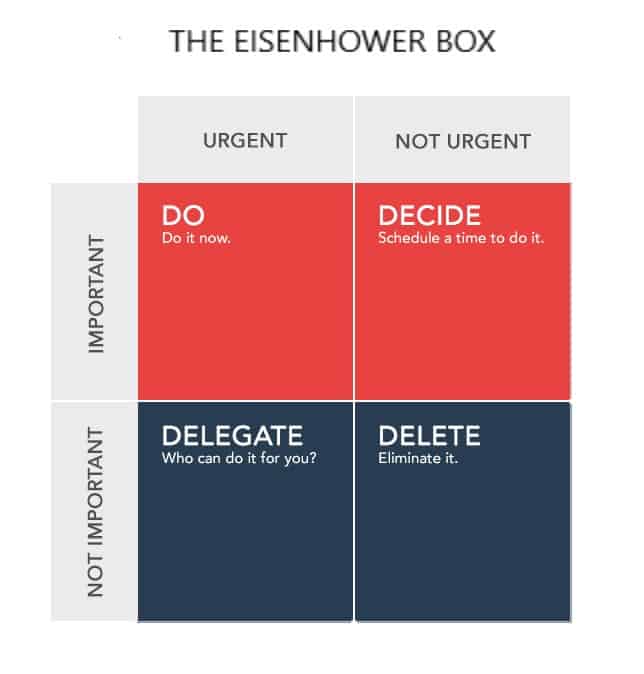
This simple exercise teaches you to quickly identify the importance and urgency of tasks on your plate and to separate them accordingly. It's often easy to unintentionally procrastinate by doing tasks ourselves that could have been delegated or eliminated altogether.
What is important is seldom urgent and what is urgent is seldom important.
-Dwight Eisenhower
When and How to Use the Eisenhower Method?
We all have our own method of task management, whether you use a notebook or one of the many to-do list managers out there. None of them really incorporate the Eisenhower method because tasks grouped into four separate boxes isn't an efficient (or pretty) way to work with the items on your plate.
However, it's not the act of placing tasks into separate boxes that's necessary, but the skill of recognizing when you're in a situation that requires you to prioritize the tasks demanding your attention to avoid procrastinating on them.
I've found the method to be most helpful when dealing with an overabundance of work. When the number of tasks is overwhelming, taking a few minutes to arrange and prioritize your tasks according to the logic of the Eisenhower method can be quite helpful.
You could use something like this Mac App to truly have a virtual Eisenhower Box or even print one out and fill in the blanks. (Created one you can download at the bottom of this post)
Another method is to incorporate the overarching philosophy into your workflow. If you don't already prioritize the items on your to-do list on a daily or weekly basis, I'd highly recommend you try it out for just a week. Just make a mental commitment to yourself to plan out your workday in your calendar by scheduling the time you'll work on certain tasks or prioritizing the items on your to-do list from top to bottom.
In my own workflow, I'll review all the items on my plate at the beginning of each day. I'll assign the important and urgent tasks with a P3 (red) priority level, meaning I need to work on them first. Important but not urgent tasks might get a P2 (orange) priority, while the smaller urgent tasks will be assigned a P1 (yellow) priority.
“Simplicity boils down to two steps: Identify the essential. Eliminate the rest.”
― Leo Babauta
Deletion vs Delegation
Another useful strategy taught by this method is that it can help make sure you ask the right questions. Not every task is important enough to demand your time and attention. For example, it's often helpful to look at all the work you do and then ask yourself which tasks have a direct effect on the amount of money you bring in. Establishing a mindset of differentiating the most important tasks on your list can isolate the ones you don't need to do.
For those tasks I don't need to do, I'll move them to a “Trashed” folder in my Todoist, whereas if it's something my virtual assistant can do, I'll move it to a Delegated folder and let him take it over.
So I've Prioritized My Tasks, but I'm Still Procrastinating!?!
Using methods like the Eisenhower Box or even your own prioritization system is by no means perfect. The most difficult part of any process always comes down to execution.
Maybe we ignore the important tasks and focus only on the urgent ones because we truly believe in the moment that it's the most important thing to be working on, only later having a feeling of regret that we didn't find any time to work on that big project today.
Prioritizing tasks in any system requires concerted effort and self-discipline to follow your own rules. If you find yourself still working on the wrong tasks, then you might need to time-box the important tasks or schedule them into a specific part of your day.
For example, if I have a deadline coming up in a week for an article I need to write, it's easy to get overwhelmed thinking about all the research and writing I'll need to do.
The best way to make progress while still giving myself the time to handle the urgent tasks is to schedule it in for a small period of time in the days leading up to the deadline.
As with anything we find resistance towards, it's easier to overcome the inertia of getting started if it's reduced to smaller chunks of time.
Free Download
I put together a printable document that you can quickly use to write down and prioritize the items on your plate. Often it's more rewarding to write out your items and cross them out when they're done. Try using the Eisenhower method for yourself and see how it goes.
Download the Eisenhower Box Template
Where should I send it? You can get it here.
Related Posts
- What a Plane Crash and a Near Disaster Can Teach You About Your Future Success
- Leading Virtual Teams Like Jack Welch: How to Train, Motivate, and Develop From Afar
- The Value of a Life Calendar
- How Automating Business Processes Saved Me From Being a Burnt Out Entrepreneur and Increased My Productivity
- What Captain Hindsight Can Teach You About Living a More Productive Life
- I Pitched to the CEO of a Billion Dollar Company and This is What Happened…